
 Print
Print  PDF
PDF
The Single Responsibility Principle
Just because you can doesn’t mean you should
The first of the Principle Design Series is the most important principle of them all.
The Single Responsibility Principle States:
A Software Entity Should Have One and Only One Reason to Change
The underlying concept here is to ensure that the responsibility of the Class or Method is clearly understood.
The Class or Method is only responsible for accepting the calling Method’s request and dependency parameters and returning the expected response.
The Class or Method is NOT Responsible
… For Creating the Expected Response
…… Just for Processing the Request and Delivering the Response
The Single Responsibility Principle Deep Dive
Good Class, Method, Strut and Interface design centers around an understanding the Roles and the Responsibilities that the calling Method expects the Method to perform.
The calling Method passes, as Request objects, supporting Dependencies that it believes that the supporting Method call requires to deliver the Response it requires to carry out its work.
The Single Responsibility Principles states that a Class, Method, Strut or Interface should have to perform One and Only One Responsibility.
A Software Entity has the Responsibility
… To Manage One Responsibility
…… For all of its Changes in the Future
Software design and implementation is inherently complex. By nature any one component has many “Moving Parts”.
The Single Responsibility Principle states that the Software Entity should have a single, well-defined State or Behavior function.
Data Transfer Objects (DTOs), as State devices, should have collections of Properties that encapsulate a related group of data elements.
It should be clear the viewer, reading the Software Entity code, the “What” and the “How” of the underlying intent of the Software Entity.
SRP helps to manage complexities in the design by encapsulating the design into manageable entities that can be understood much faster and easier.
A Class, Method, Strut and Interface should be lean.
It should be small and easy to read and understand. The name should clearly define its responsibility.
There should not be any complicated logic within the Method being called by a Client Class Method.
Helper Methods, defined by their Single Responsibility, should be abstracted away from the parent class as Private Class Methods or Public Utility Helper Methods created as Reusable Dependencies within other Classes.
Here are the major signs of a Software Entity that has violated SRP:
- A Vague or Ambiguous Name – If you cannot verbalize the responsibility from the name it may be in violation
- Constructor or Method Parameters that are not Related to each Other – If there are a large number of parameters that clearly perform different tasks that is a violation of SRP
- Numerous Regions or Comment Sections – Code should be self-defining. The need for separation by regions for anything other than Private Helper Methods and Private Classes are a clear sign of SRP violation
- Large Classes – A Class is hundreds or thousands of lines of code almost always is a violation of SRP
- Large Methods – A method that takes longer than five seconds to understand its intent is more than likely trying to perform Dependency Responsibilities within the Client called Method
- Algorithms within the called Method – All Units of Work required by a called Class should be refactored into single responsibility Helper Methods. This abstracts the inner workings of the Dependency from the consuming Method. If the details change you do not involve the consumer of that change. This complies with the Open / Closed Principle.
- An Interface that has Contract Signatures that are Unrelated – This violation is the worst of the SRP violations as it spawns, by its very existence, violations of the Single Responsibility Principle. It forces all implementing Classes or Struts to violate SRP
The Print SRP Violation
The Client had asked for a simple application to print some data from a text file to the computer screen for easy validation of its content.
The Original User Story:
As a Administrator of Documents
I want a quick and easy tool to verify the contents of a selected document on my computer screen
So that I know that I am about to process the correct document
The Original Solution:
The original solution had four responsibilities:
- Retrieve the data from a selected file on a file server disk drive: An I/O operation
- Format the data for display: Format for a computer screen
- Select the output device: A Console application display
- Display the Retrieved Data (1) that is Formatted for a Computer Screen (2) from a Console Application(3) to the User’s Computer Screen(4)
The developer chose to create a single Console application class and provide three of requirements stated above in a method that was called by the “Main” method of the Console Application.
Functionally the Solution is Correct, it Worked Fine
… Until a Change Request was Created to Add the New Functionality!
|
1 2 3 4 5 6 7 8 9 10 11 12 13 14 15 16 17 18 19 20 21 22 23 24 25 26 27 28 |
using System; namespace SRP.PrintDocsLegacy { public class PrintData { private static void Main() { // Responsibility #1: Choose a Format - Hard coded for Landscape Only var printFormat = "11 x 17"; // Responsibility #2: Select a Device Type to Print Data - Only a Console is Available var printDevice = "I am Printing to the Console"; // Responsibility #3: Acquire the Print Data - The Class is Named 'PrintData' not 'Get and Print Data' var printData = "This is the Data from the Legacy Code"; // Responsibility #4: This is the True One and Only One Responsibility of the 'PrintData' Class Console.WriteLine(""); Console.WriteLine("The SRP Legacy Print Data Demo:n"); Console.WriteLine("tSelected Printer Format: {0}n", printFormat); Console.WriteLine("tSelected Printer Device: {0}n", printDevice); Console.WriteLine("tLegacy Print Data: {0}n", printData); Console.WriteLine("All Demo Data Display Complete"); Console.ReadKey(); } } } |
The scope of the project has now changed and the Client wishes to add enhanced capabilities to the original deliverable.
The original code can not support the change. It must now be refactored into its discrete responsibilities so that it is extensible for the new requirements.
The New User Story:
As a Administrator of Documents
I want a quick and easy tool to verify the contents of a selected document on my computer screen and print the results to a printer, if required
So that I know that I am about to process the correct document and can work with a hard copy of the document
Console Display Class – The only root level class: The highest level of application abstraction
|
1 2 3 4 5 6 7 8 9 10 11 12 13 14 15 16 17 18 19 20 21 22 23 24 25 26 27 28 29 30 31 |
using System; using SRP.PrintDocs.Refactored.Enums; using SRP.PrintDocs.Refactored.ViewModels; namespace SRP.PrintDocs.Refactored { public class PrintData { static void Main() { var printFormat = PrinterFormatter.FormatData(PrintFormat.Landscape); var printDevice = PrinterOutputDevice.SelectOutputDevice(OutputDevices.Console); var printData = PrinterOutputData.GetDataFromFile(); PrintDataToOutputDevice(printFormat, printDevice, printData); } #region Print Helper public static void PrintDataToOutputDevice(string printFormat, string printDevice, string printData) { Console.WriteLine(""); Console.WriteLine("The SRP Refactored Print Data Demo:n"); Console.WriteLine("tSelected Printer Format: {0}n", printFormat); Console.WriteLine("tSelected Printer Device: {0}n", printDevice); Console.WriteLine("tRefactored Print Data: {0}n", printData); Console.WriteLine("All Demo Data Display Complete"); Console.ReadKey(); } #endregion } } |
The Enums from the Enums Folder: Prevent the use of “Magic Strings”:
|
1 2 3 4 5 6 7 8 9 |
namespace SRP.PrintDocs.Refactored.Enums { public enum OutputDevices { Printer, XmlFile, Console } } |
|
1 2 3 4 5 6 7 8 |
namespace SRP.PrintDocs.Refactored.Enums { public enum PrintFormat { Landscape, Portrait } } |
The State Data Transfer Object (DTOs) Classes from the ModelDTOs Folder: Encapsulates common state information:
|
1 2 3 4 5 6 7 8 9 10 11 12 |
namespace SRP.PrintDocs.Refactored.ModelDTOs { public class SamplePrintDataDTO { public string PrintData { get; set; } public SamplePrintDataDTO() { PrintData = "This is the Data from the Refactored Code"; } } } |
|
1 2 3 4 5 6 7 8 9 10 11 12 13 14 15 16 17 18 |
using System.Collections.Generic; namespace SRP.PrintDocs.Refactored.ModelDTOs { public class SamplePrintFormattingTypesDTO { public Dictionary<string, string> PrintFormatters { get; set; } public SamplePrintFormattingTypesDTO() { PrintFormatters = new Dictionary<string, string> { {"Portrait", "8.5 x 11"}, {"Landscape", "11 x 17"} }; } } } |
The Behavior Object Classes from the Dependencies Folder: Encapsulates Single Responsibility behavior actions:
|
1 2 3 4 5 6 7 8 9 10 11 12 13 14 15 16 |
using SRP.PrintDocs.Refactored.Enums; using SRP.PrintDocs.Refactored.ModelDTOs; namespace SRP.PrintDocs.Refactored.ViewModels { public class PrinterFormatter { public static string FormatData(PrintFormat format) { var formattingTypes = new SamplePrintFormattingTypesDTO(); return format == PrintFormat.Landscape ? formattingTypes.PrintFormatters["Landscape"] : formattingTypes.PrintFormatters["Portrait"]; } } } |
|
1 2 3 4 5 6 7 8 9 10 11 12 |
using SRP.PrintDocs.Refactored.ModelDTOs; namespace SRP.PrintDocs.Refactored.ViewModels { public class PrinterOutputData { public static string GetDataFromFile() { return new SamplePrintDataDTO().PrintData; } } } |
|
1 2 3 4 5 6 7 8 9 10 11 12 13 14 15 16 17 18 19 20 21 22 |
using SRP.PrintDocs.Refactored.Enums; namespace SRP.PrintDocs.Refactored.ViewModels { public class PrinterOutputDevice { public static string SelectOutputDevice(OutputDevices outputDevice) { switch (outputDevice) { case OutputDevices.Printer: return "I am Printing to the Printer"; case OutputDevices.Console: return "I am Printing to the Console"; case OutputDevices.XmlFile: return "I am Printing to an XmlFile"; default: return "I can not print as I do not have a valid device"; } } } } |
The Legacy Code is much simpler for the SRP.PrintDocs.Legacy application than the Refactored SRP.PrintDocs.Refactored application but it is tightly coupled with its delivered purpose.

The folder structure for the SRP.PrintDocs.Refactored complies with the Object Oriented Programming Pillar: Encapsulation. All the Dependencies and Responsibility comply with encapsulation principle of “Data Hiding“.
The refactored application encapsulated the State objects in DTOs and Enums while the Dependencies Methods are all encapsulated in the Action Classes in the Dependency folder.
If the requirements for additional Formatters, Devices or Data Sources are requested they can be added without opening the PrintData() application method. This complies with the Open / Closed Principle (OCP).
Both of the applications present the correct output:
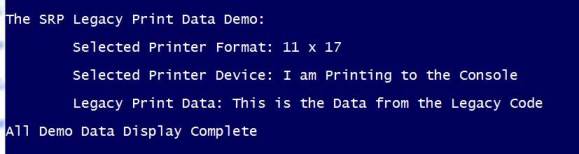

The major advantage of the refactored version is a complete understanding of the intent of each of the Software Entities within a few seconds.
If a change is requested the folder structure directs the developer to the correct Entity.
The Next Principle Design Series Post:
The DRY Principle
…Repetition is the Root of All Software Evil


Latest posts by Brad Huett (see all)
- DevOps: A Bridge to Your DevOps Culture - March 25, 2016
- Embracing Test Driven Development (TDD) - March 25, 2016
- DevOps: Delivering Agile Projects - March 25, 2016